Abyssal Lapidary gameplay: Demo and Gem-Cutting Guide
Explore Abyssal Lapidary gameplay, gem cutting, Silver License progression, and gothic mysteries, plus tips for trying the free Steam demo.
Abyssal Lapidary Gameplay: What You Actually Do
A beautiful gemstone can save your struggling business—but the next rock on your workbench might be alive. Abyssal Lapidary gameplay combines hands-on mineral processing with shop management and gothic mystery, making the quality of your craftsmanship matter to both your income and your progress. If short clips have caught your attention, understanding the full Abyssal Lapidary gameplay loop helps you decide whether its patient, precision-focused work is worth trying.
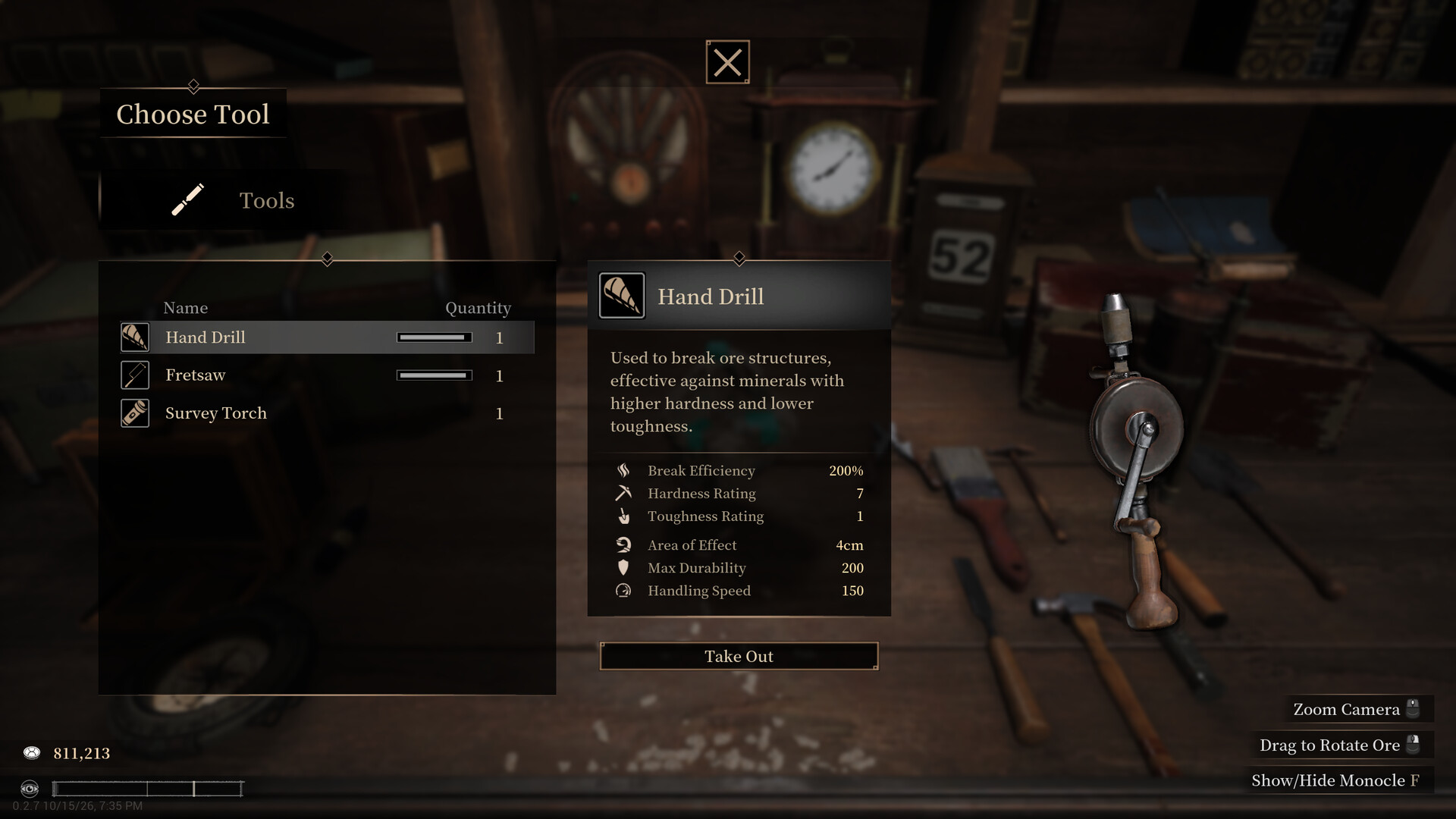
Official screenshot · Source: Steam store
Developed by Light Worm and published by XD, the game puts you in charge of the declining Vermilion House in Fathomholm, a Victorian-inspired underground city. Your trade is lapidary: turning rough mineral material into gemstones and jewelry.
As of October 24, 2026, the full game is listed as coming soon, while a free public demo is available. This guide draws on the official Steam description and PC Gamer’s October 23 hands-on demo coverage, rather than firsthand testing.
| Feature | What the available sources establish |
|---|---|
| Core activities | Appraising ore, removing impurities, cutting gems, and crafting jewelry |
| Business setting | Vermilion House, an inherited business in decline |
| Customer interactions | Buying raw materials and selling valuable stones |
| Early progression | Earning renown and applying for a Silver License |
| Narrative direction | Unusual minerals, hallucinations, and secrets within the house |
| Availability | Free demo available; full release listed as coming soon |
The appeal is the connection between these activities. You are not simply collecting gems or watching a production timer finish. You handle the material, make consequential cuts, sell your work, and gradually gain access to more of the business.
Where to Watch Gameplay and How to Try the Demo
The most direct starting point for Abyssal Lapidary gameplay footage is the official Abyssal Lapidary Steam page, with its gameplay trailer and free demo. Its media gallery includes an English gameplay promotional video listed at approximately 1 minute and 18 seconds.
That is useful for a quick introduction, but a short trailer cannot establish how an entire working day feels. When evaluating longer gameplay videos, look for the transitions between buying materials, processing rocks, serving customers, and waiting for the next opportunity.
What to look for in gameplay videos
| Sequence to watch | What it helps you judge |
|---|---|
| Initial house exploration | How navigation and access to work areas are introduced |
| Customer transactions | How much attention the shopkeeping side requires |
| Rock breaking | Whether the repeated mineral-processing work appeals to you |
| Gem faceting | How clearly the game communicates cutting precision |
| License progression | How additional crafting activities become available |
| Quiet periods | Whether the pacing suits your preferred play style |
Be especially cautious about treating a satisfying cutting clip as a complete representation of the game. PC Gamer’s demo coverage describes a slower routine with periods of downtime, alongside a time-fast-forward option.
Starting the public demo
Visit the Steam listing, find the demo download section, and check the current requirements before installing. The public demo announcement is dated October 16, 2026, and the listing also shows demo version 0.2.15 patch notes dated October 23.
Because this is a pre-release build, use current in-game instructions over older walkthrough details whenever they differ. Exact unlock requirements, balance, and interface behavior may change before launch.
The Core Loop: Buy Ore, Reveal Gems, Build Renown
The clearest way to understand Abyssal Lapidary gameplay is as a workshop-and-customer cycle. Raw material comes into the business, your tools reveal its potential, and sales support further progression.
PC Gamer’s demo account describes early access to rock-breaking equipment, a tool-repair station, and a customer booth. Much of the house initially remains inaccessible.
1. Explore before settling into production
Your first practical task is orientation. Locate the available workstations and customer area before concentrating on a single rock.
A useful opening checklist is:
- Find where customers approach the business.
- Identify the rock-processing workspace.
- Locate the tool-repair station.
- Note locked doors without assuming you have missed their keys.
- Check what the game currently asks you to accomplish.
This gives you a workable route through the house and keeps early progression from feeling like aimless exploration.
2. Treat customers as suppliers as well as buyers
Visitors do more than purchase finished goods. In PC Gamer’s reported demo session, some brought rocks and minerals to sell, while others offered different interactions, including a loan and a search for unusual artifacts.
That makes the customer booth important even when you have little finished inventory. A visitor may provide the material for your next productive session.
Practical tip: While learning, preserve some spending flexibility rather than committing everything to unfamiliar materials. This is a cautious beginner approach, not a confirmed optimal money-making strategy.
3. Break rocks to discover what is inside
Early work involves carefully hammering larger rocks into smaller pieces to uncover useful minerals. PC Gamer reported finding ordinary apatite, fine apatite, and crude duskstone during the demo.
These examples show that both mineral identity and quality labels deserve attention. Avoid treating every discovery as interchangeable inventory.
| Stage | Your immediate goal | Beginner habit to develop |
|---|---|---|
| Acquire material | Obtain rocks or minerals from visitors | Read the available information before buying |
| Process rocks | Expose potentially valuable contents | Observe what each action reveals |
| Assess discoveries | Distinguish materials and quality labels | Compare results instead of selling automatically |
| Sell goods | Generate income and build renown | Pay attention to progression feedback |
| Expand capabilities | Access additional work | Check license availability after making progress |
4. Use waiting time deliberately
A slower day is not necessarily a failed day. PC Gamer noted that time can be fast-forwarded, reducing the need to wait through uneventful stretches.
Before advancing time, check whether you have customers to serve, material to process, or equipment that needs attention. Then use the feature when there is genuinely nothing useful to do.
Gem Cutting and the Silver License: Where Precision Matters
For many viewers, gem faceting is the main attraction of Abyssal Lapidary gameplay. However, the demo account indicates that this workstation is part of progression rather than an activity available immediately.
PC Gamer’s writer earned enough renown through sales to apply for a Silver License, which unlocked access to the gem faceting table.
The available sources do not establish an exact renown threshold, guaranteed timeline, or fastest route. Be wary of guides that present precise requirements without identifying their demo version.
Why cutting quality affects your earnings
According to PC Gamer’s hands-on report, faceting has a narrow window for a perfect result. Grinding for too long—or stopping too early—can substantially reduce a gem’s value.
That creates a direct relationship between manual execution and business performance. Finding promising material is only part of the job; your finishing work also matters.
| Cutting consideration | Reported consequence | Useful approach |
|---|---|---|
| Too little grinding | Reduced gem value | Learn to recognize the intended stopping point |
| Too much grinding | Reduced gem value | Avoid continuing simply because the tool still works |
| Precise execution | Preserves the opportunity for a better result | Watch the feedback throughout the cut |
| Different minerals | Official description says materials behave differently | Reassess your approach when the material changes |
A sensible beginner practice routine
When you unlock faceting, prioritize understanding over speed:
- Read the workstation instructions before starting.
- Pay attention to the feedback during the first attempt.
- Compare the finished result with your execution.
- Identify whether you stopped early or continued too long.
- Apply that lesson to the next suitable stone.
If your inventory gives you a choice, practicing on less valuable material is a reasonable precaution. It is not a documented exploit or guaranteed profit method—just a way to reduce the stakes while learning.
The official description also includes setting polished gemstones into jewelry. Keep that broader crafting promise separate from the specific early-demo sequence documented by PC Gamer.
Gothic Horror, Pacing, and Whether It Fits Your Taste
The most distinctive part of Abyssal Lapidary gameplay is the tension between orderly craftsmanship and materials that resist ordinary explanation.
The official description connects prolonged work with sharper perception and increasing hallucinations. It describes living-looking ore, unnatural growths inside stone, whispers, and hidden spaces within Vermilion House.
Those are advertised narrative elements, not confirmation that every event appears in the current demo. The available hands-on coverage primarily discusses the workshop routine and early progression.
Relaxing work, unsettling surroundings
PC Gamer characterized the demo’s mineral work as methodical and relaxing, while also noting that the pace can be slow. Both impressions can coexist with the game’s horror premise.
You might enjoy carefully processing a rock while remaining uneasy about the building around you. That contrast is more informative than labeling the game simply “cozy” or “scary.”
| Your preference | What to consider |
|---|---|
| Hands-on crafting | Mineral processing and faceting are central activities |
| Shopkeeping progression | Sales, renown, and licenses provide forward movement |
| Fast, constant action | Reported downtime may be a drawback |
| Gothic mysteries | The official premise emphasizes the house’s buried history |
| Predictable crafting materials | Different mineral behavior may require adjustment |
| Completely comfortable relaxation | Hallucinations and body-horror-like mineral imagery may not suit you |
Check accessibility and hardware before playing
Steam lists accessibility options including saving at any time, color alternatives, camera comfort, custom volume controls, and playability without quick-time events.
That last feature should not be confused with a guarantee that crafting requires no precision. The reported faceting challenge still makes careful execution relevant.
The listed minimum PC requirements include:
- Operating system: Windows 10, 64-bit
- Processor: Intel Core i5-8400 or AMD Ryzen 5 2600
- Memory: 8 GB RAM
- Graphics: GTX 1650, GTX 1060 6 GB, or Radeon RX 570 with 4 GB VRAM
- DirectX: Version 12
- Storage: 10 GB available space
Steam Deck compatibility is currently marked unknown. If handheld performance or a particular accessibility option determines whether you can play, use the demo to test your own setup rather than relying on assumptions.
Ultimately, Abyssal Lapidary gameplay looks best suited to players who enjoy learning a craft, improving a small business, and investigating a setting at an unhurried pace. The demo is the practical next step: it lets you judge the repeated work, not just the most eye-catching cuts.
FAQ: Abyssal Lapidary Gameplay and Demo Details
Is Abyssal Lapidary available now?
As of October 24, 2026, a free public demo is available on Steam, while the full game remains listed as coming soon. The supplied official listing does not provide a specific full-release date.
How do you unlock gem cutting in the demo?
PC Gamer’s hands-on coverage reports that earning renown through sales allowed the writer to apply for a Silver License, unlocking the gem faceting table. The sources do not specify the exact renown requirement, so check your current build’s progression instructions.
Is Abyssal Lapidary gameplay relaxing or scary?
It combines both qualities. The early workshop routine was described as methodical and relaxing in PC Gamer’s demo coverage, but the official premise includes disturbing minerals, hallucinations, and a gothic mystery. Do not assume its crafting focus means it is free of unsettling content.
Do bad cuts reduce a gemstone’s value?
Yes, according to the reported demo experience. Grinding for too long or not long enough can significantly lower a gem’s value. Learning the faceting feedback and practicing carefully are therefore useful parts of improving your workshop results.
Related Guides
Abyssal Lapidary demo trailer: Where to Watch & Play
Find the Abyssal Lapidary demo trailer, explore its gem-cutting and horror premise, and check Steam demo details, PC specs, and practical tips.
Abyssal Lapidary no commentary: Demo Viewing Guide
Explore Abyssal Lapidary no commentary gameplay: what to watch for, how to choose demo videos, and what to expect from its gothic gem-cutting sim.
Abyssal Lapidary reveal trailer: What to Know
Looking for the Abyssal Lapidary reveal trailer? Find where to watch, how gem cutting works, and what to know about the free Steam demo.
Abyssal Lapidary gem cutting: Beginner Guide
Explore Abyssal Lapidary gem cutting, from ore appraisal to jewelry crafting, with confirmed mechanics and practical tips for the demo.
Abyssal Lapidary activation anomaly: Demo Guide
Understand Abyssal Lapidary's anomaly warnings, unusual finds, and activation lore, with practical demo tips and clearly labeled player experience.